Calendar, plus, check, sparkle
Since 2023, the MDS icon library has more than doubled, growing from 220 to 476 icons. Many new icons were added to support Maersk’s logistics and industry-specific workflows, where users need to scan pages and make decisions quickly. Others were needed to visualise emerging technologies like EVs and AI.
A growing problem
As the library has grown, so have the inconsistencies. Many of the new icons combine a base icon with an add-on symbol, such as a checkmark, plus sign, or sparkle, using the Brand CVI’s 1-pixel outlined stroke style. Since they were created in response to individual requests rather than a defined system, different approaches emerged over time.
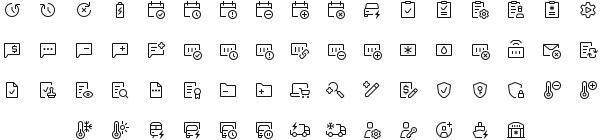
Audit of existing icons
I started by mapping out the combined icons we already have, which included the base icons, the add-ons used, and whether those add-ons exist as standalone icons. This gave a better overview of the current state, showing where the implementation is consistent and where it varies.
Of the 476 icons, 64 are combined icons, excluding base and arrow combinations. Add-ons are placed both inside and outside the base icon, and in some cases, the base icon shifts position or adjusts in size. This inconsistency made us step back and reevaluate how we design combined icons, making sure they remain legible and visually cohesive as the library continues to expand.


Industry patterns
From there, I compared how four leading design systems tackle the same challenge: Fluent UI, Material, SF Symbols, and Carbon.
Across all four, add-ons are placed in the corner with clear white space separating them from the base icon. Fluent consistently uses filled add-ons, while Carbon uses an outlined style throughout, making it the closest match to MDS. Three of the four libraries place add-ons (e.g., plus, minus, clock, exclamation) inside filled circles, unlike MDS, which uses outlined styles. This approach clearly separates add-ons from base icons in a way that the outlined MDS approach currently does not.
Additionally, some base icon and add-on combinations can come in more than one structure within the same library. A checkbox paired with a clipboard, for instance, can appear either inside the base icon or as a corner badge. Sometimes, that difference is significant enough to justify designing both versions.
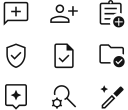
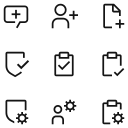
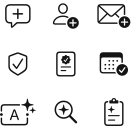
Design exploration
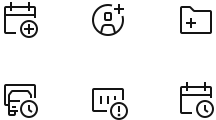
I explored three main approaches to designing add-ons, keeping in mind how the chosen direction would affect scope. The current implementation uses an outlined add-on, sometimes placed inside an outlined circle. In complex icons, this can cause the add-on to read as part of the base icon rather than a separate element.

Taking inspiration from Carbon, I tried removing the circle and adjusting the size of the add-on, balancing symbol recognisability with the visual hierarchy between base and add-on.

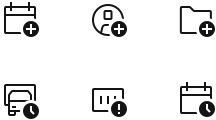
The third approach was to place add-ons inside a filled circle or use a filled style entirely. This creates the clearest separation from the base icon, though it also moves furthest from the current Brand style.

Design direction and scope
One direction stood out. Symbols that communicate key actions, statuses, or alerts, such as plus, minus, checkmark, X, clock, and exclamation mark, are the top priority for redesign. Users need to recognise these instantly. Placing them inside an 8-px filled circle with a 1.5-px cutout, positioned in the bottom-right corner unless it obstructs key parts of the base icon, creates a clear figure-ground relationship between the add-on and the base icon, establishing visual hierarchy and preventing the two from blending.
Further opportunities
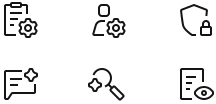
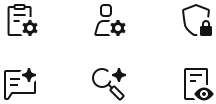
Other add-ons can also benefit from a filled style, specifically cog and sparkle, and potentially lock, key, pen, ribbon, and stamp. Expanding beyond the solid circle pattern requires reviewing the impact on overall visual balance across applications.
Exceptions
Not all symbols can be drawn in a solid style while fitting the brand’s icon style, or they will become harder to identify. Therefore, add-ons such as links or magnifying glasses should remain outlined, as seen in other design systems.
Additionally, some icons have clearer meaning when the modifier is placed within the base icon. Or both versions can be valid, depending on the intended message.
Your feedback
The main question: does the filled add-on make combined icons easier to scan, or does it add too much visual emphasis in Maersk’s information-heavy UIs?
Your feedback will help guide our next steps. The mockups below show mockups of Maersk’s products with current and updated icon styles. We would love to hear your feedback, especially if you use such combined icons in your applications.